Clergy Formation · Framework
Should I Use AI for This?
A decision tree for AI in your ministry
Click here to download a printable PDF version of this resource.
Download the decision tree (PDF)Interactive version
Walk a task through the five gates
Choose one real ministry task. Your answers will identify cautions and suggest a next step; they are not saved or sent anywhere.
This is a self-discernment tool for clergy and lay leaders about their own use of AI in congregational work. For walking with a congregant about their use, see The Four Pastoral Levels and the Pastoral Care Approaches primer.
How to Use This Tool
This tool answers one task at a time. It will not tell you whether AI belongs in ministry; it will help you decide whether AI belongs in this task, this week.
So begin by naming the task in one sentence. Not “should I use AI?” but “should I use AI to draft this month’s newsletter?” or “to outline Sunday’s sermon?” or “to summarize my counseling notes?” That sentence is what you carry through the five gates below.
The gates are asked in a deliberate order: confidence before usefulness, formation before efficiency. Each gate guards a different thing that can be lost. Some gates stop you. Most simply name a caution and let you continue with your eyes open.
The Five Gates
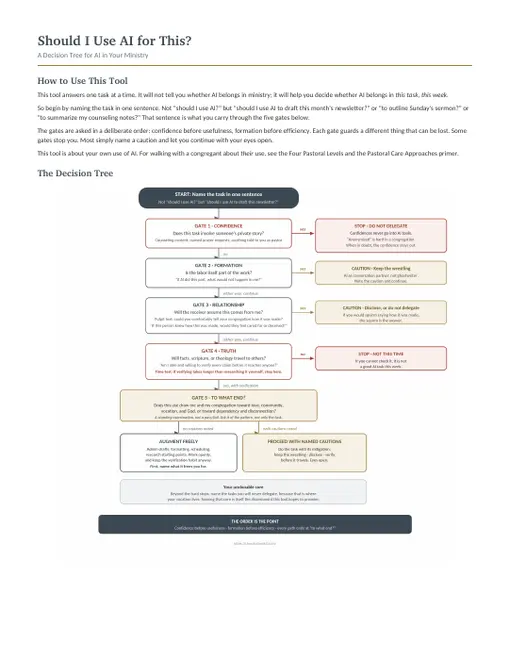
Gate 1: The Confidence Gate — Does this task involve someone’s private story?

This gate comes first because it is the only hard stop, and it comes before any question of how helpful the AI might be. If the task involves identifiable pastoral confidences (counseling content, prayer requests with names, a family’s crisis, anything told to you because you are their pastor), the answer is: do not put it into an AI tool. Not summarized, not “just to organize my thoughts,” not with names removed.
One honest nuance: “anonymized” is harder than it sounds in a congregation. “A member facing a difficult diagnosis” identifies someone to anyone who knows the community. The details that make a story worth summarizing are usually the details that make it recognizable. When in doubt, the confidence stays out.
If the task passes this gate, continue.
Gate 2: The Formation Gate — Is the labor itself part of the work?

For some tasks, the struggle is the point. Wrestling with the text is how the sermon forms the preacher before it forms anyone else. Writing the prayer is part of praying it. Sitting with the hard letter is part of loving the person it goes to.
The question to ask: ”If AI did this part, what would not happen in me?”
This gate rarely says stop. What it does is draw the line between augmenting and delegating. AI as a conversation partner, a devil’s advocate, a research assistant, or a first reader can serve your formation. AI as a ghostwriter displaces it. If this gate raises its hand, the caution is: keep the wrestling. Use the tool to sharpen your work, not to replace the work that sharpens you.
Gate 3: The Relationship Gate — Will the receiver assume this comes from me?

A condolence note, a pastoral email, a wedding homily, a personal reference: the recipient’s belief that you wrote it is part of what the thing is. For these, ask: ”If this person knew how this was made, would they feel cared for or deceived?”
A memorable test for this gate: the pulpit test. Could you comfortably tell your congregation how this was made? If yes, proceed. If the thought makes you squirm, the squirm is the answer, or it is the signal that disclosure is owed. Some communities will receive “I use AI to help polish the newsletter” with a shrug; almost none will receive “the sympathy card was generated” with anything but hurt. When the relationship is the point, the caution is: disclose, or do not delegate.
Gate 4: The Truth Gate — Will facts, scripture, history, or theology travel to others, and can I verify them?

AI tools are confidently wrong at unpredictable moments: invented citations, misattributed quotes, plausible-sounding theology that no tradition holds. If your task sends factual or scriptural content toward the congregation, ask: ”Am I able and willing to check every claim before this reaches anyone?”
If the honest answer is no (no time this week, or the subject is outside your competence to check), then this is not a good AI task this time. That is not a verdict on the tool or on you; it is a verdict on this task, this week.
Apply a simple time test: if checking the AI’s claims would take longer than doing the research yourself the traditional way, the tool has saved you nothing, and the answer defaults to “not this time.” Verification is not an add-on to the shortcut; it is the price of the shortcut. When the price exceeds the savings, the honest move is to decline.
If the answer is yes, continue, and let “verify before it travels” become a habit rather than a resolution.
Gate 5: To What End? — Does this use draw me and my congregation toward love, community, vocation, and God, or toward dependency, diminishment, and disconnection?

Every path through this tool ends here, whatever the earlier gates said. This gate is not pass/fail. It is a standing examination, the question that keeps this tool a practice of discernment rather than a compliance checklist. Ask it not only of the single task but of the pattern your tasks are forming: what is my use of these tools, taken together, making of me and of my ministry?
The Three Outcomes
Augment freely. No gate named a caution. Administrative drafts, formatting, scheduling, research starting points, first passes at routine text. Work with the tool openly, and keep the verification habit anyway.
Proceed with named cautions. One or more gates named a caution, and the tool has told you which and what the mitigation is: keep the wrestling (Gate 2), disclose or reconsider (Gate 3), verify everything before it travels (Gate 4). Proceeding is legitimate; proceeding with eyes open is the requirement.
Do not delegate. Two ways to arrive here: the Confidence Gate’s hard stop, or the Truth Gate’s honest “not this time.” And there is a third, voluntary way: name your own unclonable core. Beyond the confidentiality floor, each minister may designate tasks they will never delegate, not because a gate forbids it but because those tasks are where their vocation lives. Naming that core is itself an act of discernment this tool wants to provoke.
Before You Begin: Name the Enhancement
The gates above guard against loss. This practice discerns the gain, and it happens before any augmenting use. Finish this sentence, out loud or on paper:
“Using AI for [this task] frees me for [this].”
The first half is easy; the tool always has something to offer. The second half is the discernment. Time saved with no named destination evaporates, usually into more screen time, and nothing was enhanced. Enhancement is measured downstream in the ministry, never in the volume of what the tool produces.
Destinations that count include presence with people; deeper study and prayer; rest and reduced burnout (legitimate fruit, not a guilty pleasure); your unclonable core; and your family. If the freed time has one of these names on it, the use is supporting your functioning. If you cannot finish the sentence, notice that before you begin.
Start from your ministry, not from the tool. Ask, “Where is my ministry starved for time and presence?” and only then, “Could AI relieve that?” Never reverse the order. A use invented merely to have a use frees you for nothing.
This practice also gives Gate 5 its concrete answer: “to what end?” is answered before you begin, in one sentence, with a destination you can check against later.
Worked Examples
Eight common tasks, walked through the gates. Your own answers may differ; the walking is the point.
| Task | Cautions | Outcome |
|---|---|---|
| Drafting the monthly newsletter | None (light Gate 4: check dates and names) | Augment freely |
| Formatting the service bulletin and schedule | None | Augment freely |
| Research starting point for a Bible study | Gate 4: verify citations and claims | Proceed: verify before it travels |
| Outlining Sunday’s sermon | Gate 2: the wrestling forms the preacher | Proceed: AI as conversation partner, not ghostwriter |
| Writing the sermon itself | Gates 2 and 3: formation and the congregation’s assumption of your voice | Do not delegate the writing; augment the study around it |
| A condolence note to a grieving family | Gate 3: the note is the relationship | Do not delegate |
| Summarizing counseling or pastoral visit notes | Gate 1: confidences | Do not delegate. Hard stop. |
| A teaching handout on church history | Gate 4: facts will travel | Proceed: verify every claim and citation |
For Reflection
Walk one real task from your past week through the five gates, one you actually used AI for or deliberately did not. Did the gates agree with the choice you made? Which gate do you most want to skip, and what might that tell you? And what belongs in your unclonable core?